How This Post Published Itself
I've wanted a blog on my personal website for a while. What I didn't want: maintaining a CMS, paying for hosting, or adding yet another deploy step to my life.
My requirements were simple
- free,
- low-maintenance,
- and built from tools I already use every day.
I live in Notion. So the real question became: can Notion be my CMS?
Turns out, yes. And the whole thing runs on a completely free stack.
The options I considered
- Astro content collections — markdown files in the repo. Free and simple, but publishing means writing markdown and pushing to GitHub every single time.
- dev.to / Hashnode APIs — write on their platform, pull posts via API. Free, but the post's real home is their site — my domain just mirrors it.
- Notion as a CMS — write in Notion, fetch posts through the Notion API at build time. Notion is just my private editing backend; the post's public home is my own domain, and the writing experience is one I already know.The content stays mine, and the writing experience is the one I already know.
How it's built
The site is Astro (with a bit of React), hosted on Cloudflare Pages. Posts live in a Notion database with a handful of properties: Title, Slug, Summary, Date, Tags, and a Published checkbox.
At build time, Astro's content layer fetches every post where Published is checked — using notion-astro-loader and the official Notion client — and renders everything to plain static HTML. No server, no runtime Notion calls, nothing to keep alive. Cloudflare Pages builds it and serves it from its global edge.
Here's the full build & deploy flow:
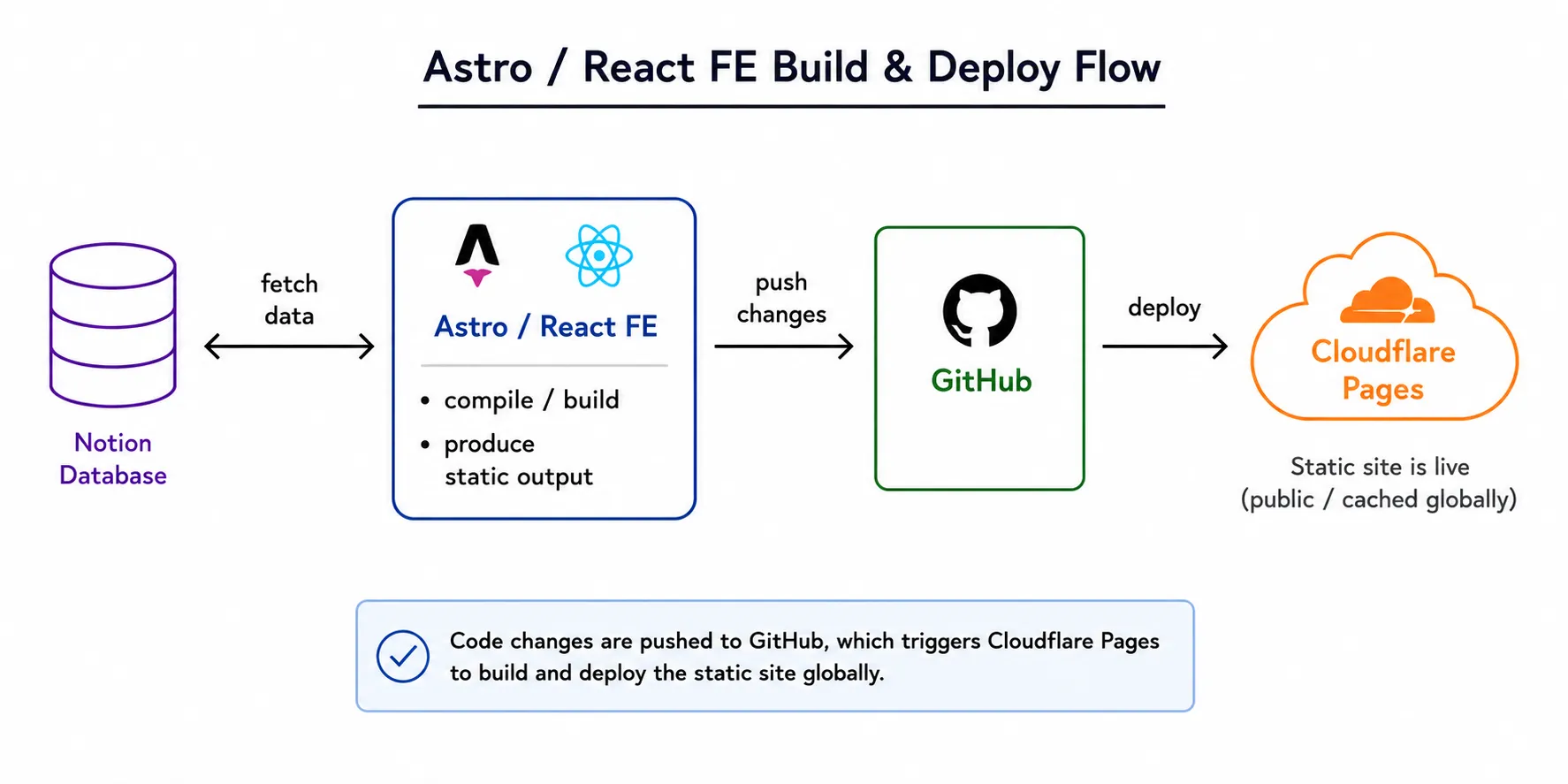
How it publishes itself
One catch with static sites: they only update when they rebuild, and rebuilds normally happen when I push to GitHub. I didn't want to open a terminal just to publish a post.
Cloudflare Pages provides a deploy hook: a URL that triggers a fresh build when you send it a POST request. But Notion's free plan can't send webhooks out. So I flipped the direction: instead of Notion pushing, a tiny Cloudflare Worker pulls.
Every 30 minutes, a cron trigger wakes the Worker. It asks the Notion API for the most recently edited published post and compares that timestamp against the one saved in Workers KV as Workers have no memory between runs, so KV acts as the memory. If the timestamp changed, the Worker POSTs the deploy hook and stores the new value. If nothing changed, it does nothing and goes back to sleep.
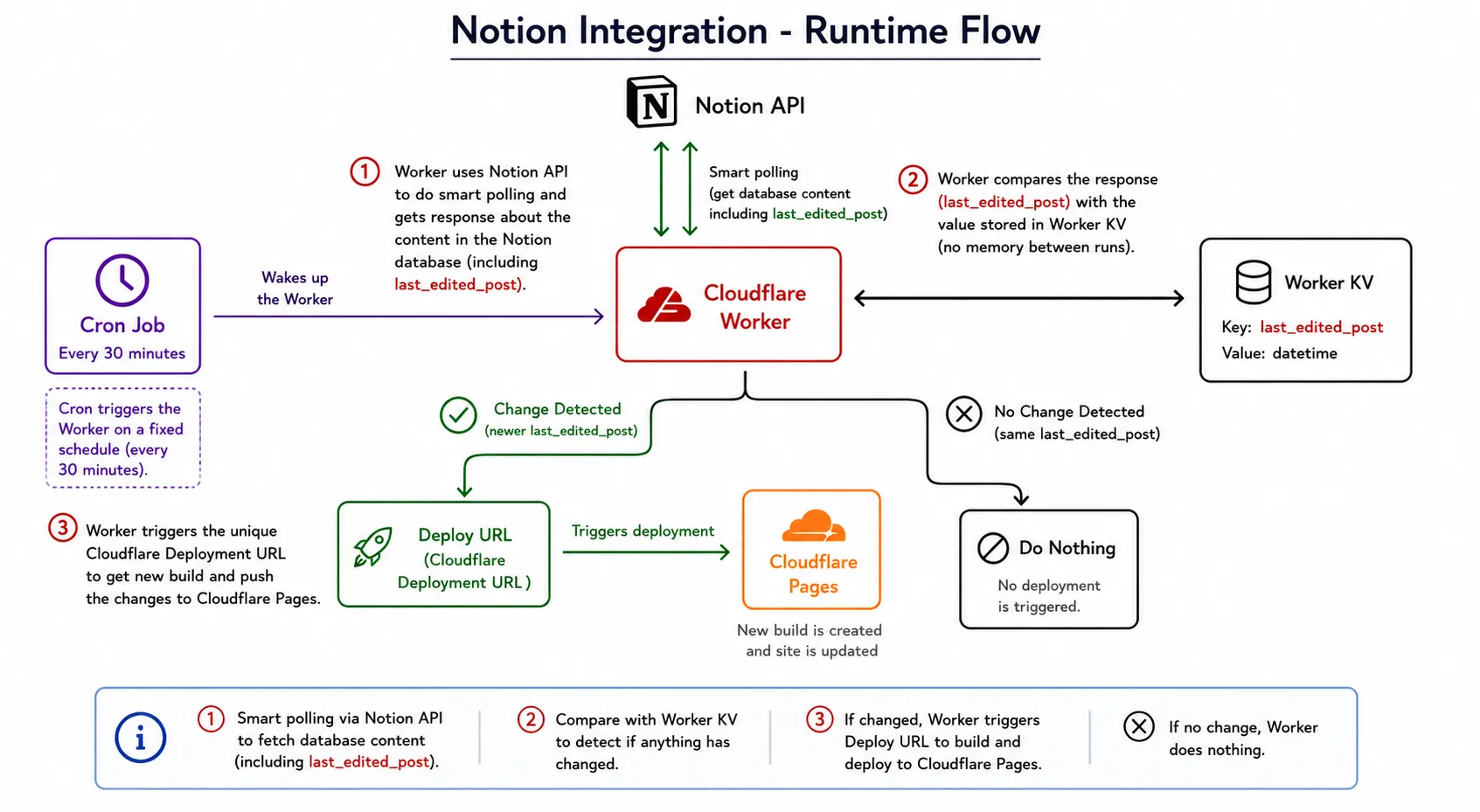
The diagram above shows this runtime flow end to end.
Net Result?
- I write in Notion, tick a checkbox, and the site updates itself within 30 minutes.
- Not Git pushes required.
- No CMS management required.
Gotchas I hit along the way
- "API token is invalid" in CI, but works locally. This almost always means the build platform isn't passing your env var. Check the exact variable name and which environment (Production vs Preview) it's saved under, then redeploy.
- Images uploaded into Notion expire. Notion serves uploaded files from signed URLs that die after about an hour, so images render right after a build, then silently break. Either rehost them at build time or paste externally-hosted image links into Notion instead.
- Deploy hooks are POST-only. You can't trigger one by just visiting the URL in a browser. Anything that calls it (curl, a Worker, an automation) must send a POST.
The bill
$0. Notion free plan + Cloudflare Pages free tier + Workers & KV free tier. The whole pipeline: CMS, hosting, automation → costs nothing.
If you already live in Notion and your site is static, this setup is genuinely hard to beat. Write, tick a checkbox, done.